
One of the shining case studies in AI use may not be what you expect. But the truth is, Airbnb is at the forefront of the professional AI revolution.
Airbnb has been using AI to vet guest bookings, personalize rental recommendations, and plan trips. As a prospective guest, there’s reason to rejoice about the platform’s new “digital concierge” service. But as a host, what can you learn from these new tactics?
The big picture right now is that Airbnb is using artificial intelligence tools to improve their user experience based on the data it collects from its users. While you as a lister may not be looking to code a virtual travel assistant for all your prospective guests, there’s still plenty you can do to follow Airbnb’s lead.
In this post, you’ll get some insight into how you, as a host, can use AI tools to write better listings that connect with real people and turn your property into a success story.
Craft Compelling Listings With AI Humanizers
Before you play a game, you need to know the rules. If you’re already an active host on Airbnb, you should know the guidelines for a listing. But, if you happen to be brand new or need a review, this is what you want to keep in mind:
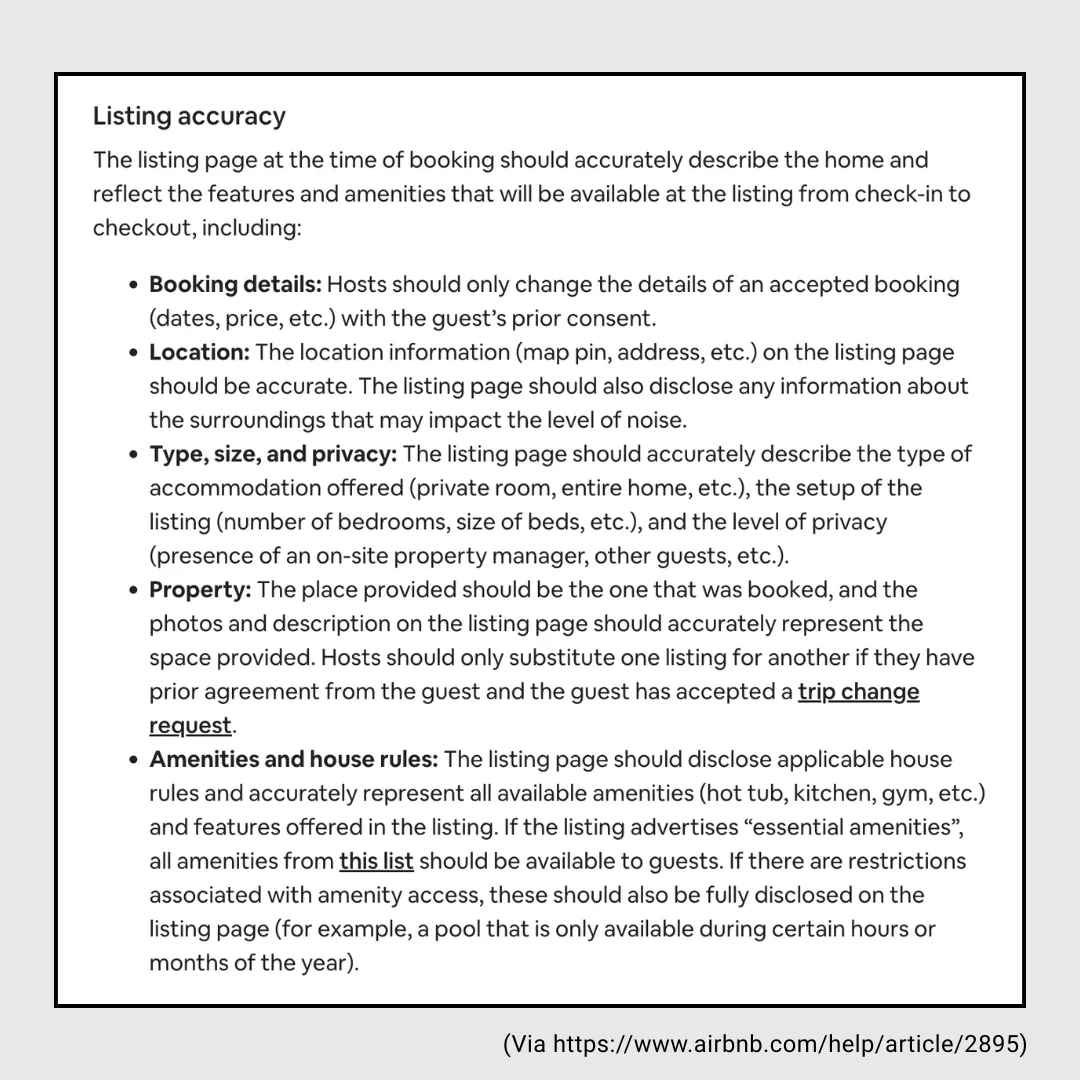
Above all else, two things to keep in mind: compliance and accuracy.
You don’t want to cross your host platform by ignoring the rules, nor do you want to upset your clientele by misrepresenting your property. No amount of brilliant copy will cancel out bad reviews.
It’s important to remember that sometimes, AI can get carried away. Words can be easily misinterpreted and build an expectation the host can't deliver.
Remember, the goal is to highlight unique features, use descriptive adjectives, mention the location, and keep it within the 50-character limit. Keep it short and sweet, and let your pictures tell 1,000 words.
To create a compelling listing with AI, you’ll need to provide your generative assistant with the same resources necessary for any listing. Have a draft description on hand, along with shining reviews from previous guests if available. While optional, testimonials are a great way to highlight the best points of your property and convey the sentiments of past visitors.
Of course, good AI outputs rely on good prompting. When you start, you should consider “priming” your chatbot by inputting something along the lines of:
[You are an Airbnb listing generator. Your task is to create enthusiastic and concise Airbnb listings. (Include word count range)]
Curious about what word count you should aim for? Check out the optimal lengths for various parts of your listings in this guide here, along with other helpful tips for crafting the perfect Airbnb listing.
In Rental Scale-Up’s video, they’re kind enough to provide the prompt they used:
We want to write an attractive listing description for our cabin in Gatlinburg. It should sound very attractive to families. To do that, we’ll give you our draft description. Then, we will give you reviews from past guests so that you can lift from these reviews relevant keywords, quotes, or sentiments to enrich the description. Do not make up facts.
You can certainly reference this and other people’s suggestions, but don’t be afraid to play around with what gets you the best results.
Whether you use someone else’s prompt or your own, mind how you approach working with AI. Consider talking to it as if you would an assistant: one who is both dumb yet in possession of unfathomable amounts of computing power.
Make sure you are providing rich input, as without it, you will only receive filler and nonsense. Include location, unique amenities, and preferably a character profile of your usual guests.
As always with AI, specificity is key. There is a world of difference between
Write a listing
and
Write a cozy, pet-friendly villa listing with a full kitchen and great access to the city and its tourist activities.
ChatGPT also does well when extrapolating from questions. For example, you can try asking: “What kind of headline would appeal to couples looking for a romantic weekend getaway?”
If you’ve already written a description, AI-powered writing assistants can rephrase what you have in a different tone, using more effective language, and even seamlessly integrating real customer reviews.
You don’t have to expect perfection on the first try. Be willing to give feedback and fine-tune the output together with your AI assistant. You’d be shocked by how much difference a little workshopping can make in humanizing your listing and turning your AI use undetectable.
Making the Most of AI Capabilities
ChatGPT is more than just a text generator. When used thoughtfully, it becomes a flexible assistant for Airbnb hosts. Here are some of the most useful things it does well:
Personalization with context (input location, target guest type, nearby attractions).
Creative phrasing and tone adjustment.
Feature reminders and highlighting overlooked amenities.
Best practices advice (titles, photo suggestions, etc.).
What about ChatGPT plus? Is it worth the upgrade? In this case, maybe, as it allows for richer input on your end that can get you the exact results you want.
Upload PDFs: You can upload property manuals, house rules, or past guest feedback. ChatGPT will analyze these to suggest improvements or create more engaging descriptions.
Upload photos: While ChatGPT doesn’t “see” photos like a human, it can analyze image files and give suggestions on photo order, composition, or even recommend which types of shots might help your listing stand out.
For further reading about using AI to craft Airbnb listings, check out the following:
One of ChatGPT’s strengths is its ability to take feedback and use it for iterative improvement. If the initial draft isn’t perfect, use it as a foundation. Provide feedback on what you liked and what could be improved. ChatGPT utilizes this feedback loop to adjust its responses and deliver increasingly tailored and effective content.
So, you’ve reached a draft, but still not sure if you like how it sounds? The next step has a way to improve that.
Humanize Your Listing
Your writing may be AI-assisted, but no one is drawn to a wall of text that’s clearly been copy-pasted out of a generator. The goal is a listing that feels authentic and personal—one that connects with your potential guests. You don’t want your copy to sound like it came from a robot, and neither do they.
If you’re concerned about robotic tone or generic text, seriously consider running your draft through an AI humanizer such as WriteHuman to refine tone and language.
As helpful as AI can be in assisting you with your writing, ChatGPT often falls short in human touch. By taking extra care, you balance the efficiency and clarity of AI-generated text with irreplaceable personality and voice.
Parting Thoughts
Airbnb may be using AI to power its global guest experience, but individual hosts can benefit from these tools too. By combining your human insight with ChatGPT’s capabilities, you can craft listings that are not only accurate and appealing, but genuinely memorable.
The future of hosting isn’t bots replacing humans. It’s humans getting smarter by using AI. Now go make that listing shine.