
Key takeaways
- Grammarly's AI Humanizer is built for readability and tone, not for changing detector verdicts.
- Third-party detector scores on Humanizer output range from 42% to 91% AI, depending on the test.
- Free Grammarly plans share one AI-action pool, so heavy humanizing pushes you to a paid seat.
- QuillBot, WriteHuman, and other dedicated tools each target a different job: paraphrasing, humanizing, or rewriting.
- Pick by user type: SEO writer, ESL writer, professional, or content creator. The right tool changes with the goal.
Grammarly's own AI Detector flagged Humanizer output at 42% AI. ZeroGPT pushed the same kind of text to 88.2%. humbot.ai logged 91%. Three different detectors, three uncomfortable numbers, all measuring the same agent.
That gap matters if you're a content creator or working pro who pastes ChatGPT or Claude writing into Grammarly hoping the Humanizer agent makes it sound like you. It might. It might not. The answer depends on what you actually need it to do.
This is a neutral look at what the Grammarly AI Humanizer does well, where it falls short, and which tool fits your job better.
What Grammarly's AI Humanizer Actually Is (and What It Isn't)
Here's the contradiction Grammarly isn't really hiding: their own AI Detector flagged Humanizer output as 42% AI. ZeroGPT scored similar output at 88.2%. humbot.ai pushed it to 91%. Grammarly never claimed otherwise. Most reviews skip that part.
So what is it? The Humanizer is a rewrite agent with four preset voices: Everyday, Precisionist, Executive, and Scholar. You can build custom voice profiles too. It rewrites for tone and readability. It doesn't rewrite for detector scores, and Grammarly's documentation says so plainly.
The agent vs. the standalone web tool
There are two flavors. The standalone lives at grammarly.com/ai-humanizer and is free with caps. The agent version is baked into the broader Grammarly product with deeper voice controls and tighter integration into whatever you're already writing.
Where it shows up
The Humanizer ships inside Grammarly docs, inside Superhuman Go (the rebranded assistant launched October 2025, after the Humanizer's September 2025 debut), and through the browser extension across Gmail, Google Docs, and most text fields you'd touch in a workday.
Here's the takeaway: Grammarly's Humanizer competes on polish and voice, not on making AI writing read as human to detectors. That single gap decides the tool for you. If your goal is detector-resistant output, a purpose-built humanizer like WriteHuman is the smarter pick. If you just want a tone swap, Grammarly's fine.
Plans, Pricing, and Where the Humanizer Shows Up
Grammarly's AI Humanizer rides inside the broader Grammarly stack, so what you get depends on which seat you're paying for. Per Grammarly's Humanizer user guide, the agent appears in Superhuman Go and inside Grammarly docs for Free, Plus, and Pro subscribers. Enterprise, Business, and Education seats get it inside docs only. No Superhuman Go.
Free, Plus, Pro: what each tier unlocks
The free tier covers basic humanization, the four preset voices (Professional, Academic, Friendly, Persuasive), and custom voice creation. Pro runs about $12/month on annual billing. There's also a standalone web tool at grammarly.com/ai-humanizer, free after sign-up. Sounds generous. Here's the catch: every rewrite chews into your monthly AI-action allowance. Run a 2,000-word piece through twice and you're near the ceiling, which quietly pushes heavy users toward a paid seat.
Enterprise, Business, Education (docs only)
Higher-tier business accounts lose the Superhuman Go integration entirely. You rewrite inside Grammarly's document editor or not at all. That's a real friction point if your team lives in Notion, Google Docs, or a CMS.
For roughly the same monthly price, WriteHuman puts its entire engineering effort into the rewrite math that makes AI text read as human-written, not into voice presets bundled with grammar checking. You're paying for focus instead of a feature bundle you'll mostly ignore.
How to Use the Humanizer (Including the 200-Word Custom Voice Profile)
Here's the workflow. Open a document at app.grammarly.com, find the agents panel on the right, and click the Humanizer icon. Pick a preset or your saved voice profile, then hit apply. Done. The same agent lives inside Superhuman Go, so you can trigger it without leaving your inbox.
Building a custom voice profile
Grammarly's docs say the custom voice profile needs a sample of at least 200 words. Hit that floor and you'll get a generic imitation. Feed it 300 to 400 words of your real writing and the output sharpens. One detail most reviews skip: the voice profile is shared between the Humanizer and Paraphraser agents across both Docs and Superhuman Go. Set it once, it follows you.
The four presets:
Everyday: neutral, conversational
Precisionist: tight, no fluff
Executive: B2B-flavored
Scholar: formal, research-leaning
Six-language support
Grammarly does have one real edge over English-only rewriters: it works in English, Spanish, French, German, Portuguese, and Italian. If you produce localized content, that's useful.
The catch is bigger than the workflow suggests. A smoother rewrite isn't the same as text that reads convincingly human to a third-party detector, and Grammarly's own documentation says the Humanizer isn't built for that. The clicks are easy. The output ceiling is the real question, and the detector scores in the next section answer it.
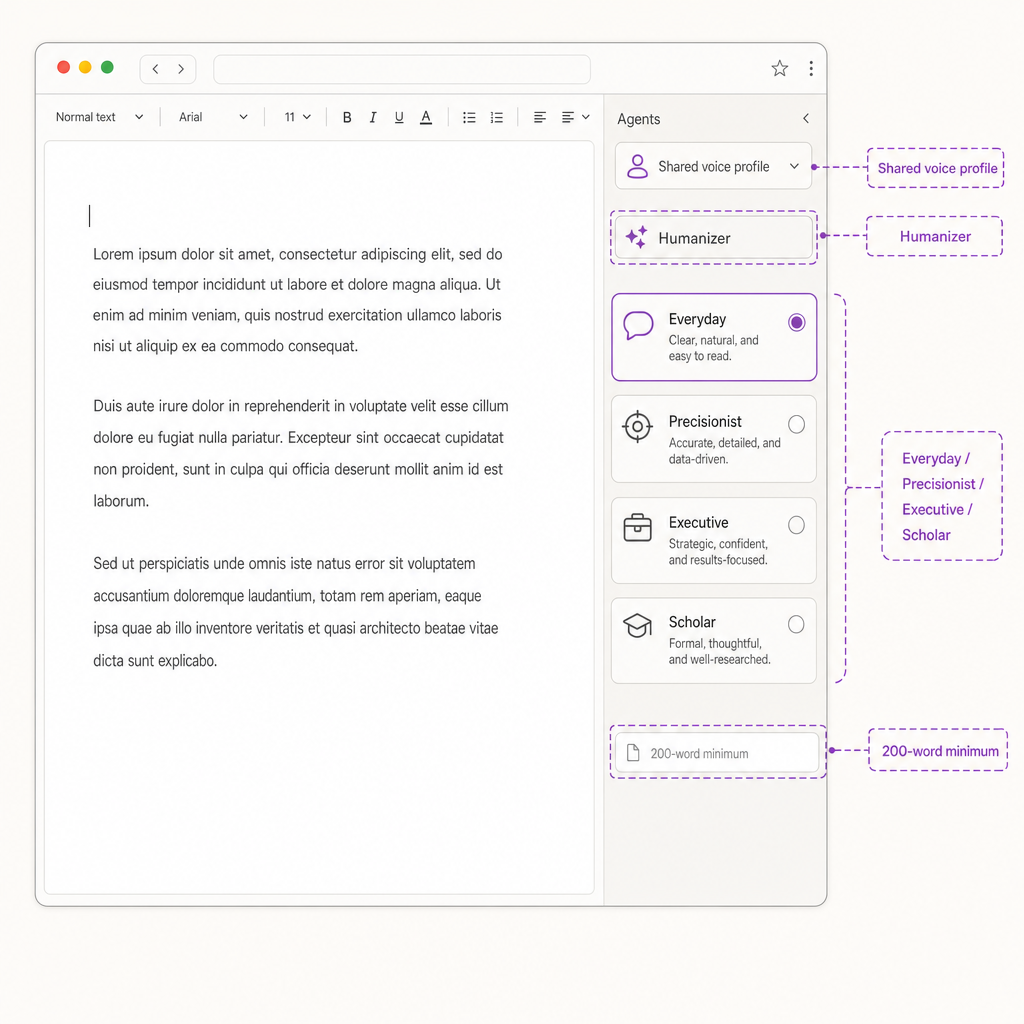
The Humanizer lives in the right panel — one profile shared across every agent.
The Detector Question: What Every Published Test Actually Shows
The stat block: every score in one place
Here's what published third-party tests actually show. After running AI text through Grammarly's Humanizer, gpthuman.ai reported a 42% AI score on Grammarly's own detector. Humbot.ai's testing went harder: 88.2% AI on a popular zero-shot detector, and 91% AI on Grammarly's detector after humanization. Those aren't passing marks. Those are the same outputs getting flagged twice.
Wider detector data backs the pattern. A January 2026 benchmark from a major detector vendor claims 90%+ detection across a dozen-plus paraphrasing and humanizer tools, and 98%+ on raw AI text. A February 2026 update from a well-known plagiarism-checking platform specifically expanded coverage of tools that modify AI writing to look human, calling them out by category in the release notes.
Why the numbers seem to contradict each other
Vendor self-reports always look rosier than reality. Independent benchmarks like RAID and the Chicago Booth 2026 study put real-world detector recall well below what detector companies advertise. So in messy production conditions, with mixed human edits and varied source models, the gap between Grammarly-edited text and a dedicated humanizer's output narrows. It doesn't close.
The pattern is consistent. Grammarly's Humanizer smooths robotic phrasing. It doesn't meaningfully shift the statistical fingerprint detectors scan for. Want cleaner readability? Grammarly handles that. Want AI writing that reads as human-written when a detector runs over it? The published numbers point you toward a dedicated humanizer like WriteHuman.
Why Grammarly's Own AI Detector Flags Its Own Humanized Output
Here's the awkward part: Grammarly's AI Humanizer regularly gets flagged by Grammarly's own AI detector at roughly 38-42% AI. That's not a bug. It's the method.
Perplexity and burstiness, minus the math degree
Detectors look at two things. Perplexity measures how predictable each word is to a language model. Low perplexity reads as AI. Burstiness measures how much sentence length and structure vary across a document. Low variation reads as AI. Per GPTZero's own technical writeup, humans naturally jump between short punches and long winding sentences, while LLMs apply the same statistical rule to every next word and produce flat output.
The method is noisy. Pangram Labs has noted that perplexity scoring can misclassify the Declaration of Independence as AI because it's so heavily memorized in training data. Real signal. Still noisy.
Here's where Grammarly's tool falls short. Swapping synonyms and softening tone (most of what its Humanizer does) doesn't move the probability distribution detectors actually score. The writing reads smoother to you. The numbers barely budge.
What Grammarly officially says
Grammarly's own documentation states the Humanizer is "not intended to work around AI detectors." It's a readability polish. Nothing more.
One more wrinkle: Grammarly's Authorship feature tracks keystrokes and pastes, not output style. Run AI text through the Humanizer and Authorship still flags the source as AI-generated. WriteHuman rewrites the text itself, which is the part detectors actually score.
Grammarly Humanizer vs. QuillBot, Hard to detect.ai, StealthGPT, WriteHuman, and Humbot
Four tools, four different jobs. Here's how they line up.
The comparison at a glance
Grammarly Humanizer: free tier capped by a shared AI-action pool, $12/month Pro. Grammarly's own documentation says the feature isn't built to rewrite around detectors. Six languages, four presets, plus a 200-word custom voice sample.
QuillBot Humanizer: 125 words and 6 uses per day on free, $8.33/month annual Premium ($6.25 student). QuillBot's help docs frame it as paraphrasing-first. The paraphraser covers 23 languages; the humanizer feature is the lighter sibling.
Specialist humanizer tools (category): paid services that position themselves around detector outcomes, typically $10 to $20/month per their public pricing pages. Different category, different promise.
WriteHuman: a dedicated humanizer built to make AI writing read like a person wrote it. Yes, it's our product.
What each one is actually built for
Grammarly competes on breadth: grammar, tone, brand voice, citations, the whole suite. The humanizer is one tile inside it, and a deprioritized one at that. Specialist humanizers compete on a single math problem, reshaping the statistical fingerprint that detectors read. Different jobs entirely.
One tell: several top-tier editorial roundups of humanizer tools skip Grammarly altogether. When the reviews that cover this category don't list it, that's a signal about which bucket it belongs in. If your goal is text that reads human, pick a tool built for that goal.
Who Grammarly's Humanizer Is Right For (And Who Should Reach for Something Else)
When Grammarly's humanizer is the right call
You're already paying for it. Your text was mostly written by a human and just reads stiff. You need coverage across Gmail, Docs, Word, and the browser, and you write in English, Spanish, French, German, Portuguese, or Italian. For professionals firing off emails and proposals, the integration breadth is convenient. For SEO writers publishing on owned domains, a detector score is editorial preference, not a gate, so a tone polish can be enough.
When to reach for WriteHuman instead
Your source came from GPT-5, Claude Sonnet 4.5, or Gemini 2.5 Pro, and it needs to read like a person actually wrote it. You're shipping long-form work that will be scrutinized by editors, publishers, or downstream AI detectors. You want a tool whose entire engineering investment goes into rewriting at the statistical level, not swapping in a friendlier tone preset. That's WriteHuman's lane.
An honest framing
Grammarly's humanizer is one option among many, and it carries real limits. It's not built to change detector verdicts (per Grammarly's own help docs), it works at the surface, and custom voice profiles need 200+ word samples before they're useful. WriteHuman is the stronger pick when the goal is full statistical reshaping. One caveat: rewriting AI output doesn't settle the integrity question. Know your publisher's or employer's disclosure rules.
Frequently asked questions
Sources (5)
- 1.Humanizer user guide – Grammarly Supportsupport.grammarly.com
Primary source for plan availability (Free/Plus/Pro vs. Enterprise/Business/Education), the 200-word custom voice requirement, and the shared voice profiles between Humanizer and Paraphraser agents.
- 2.Humanize AI Text: Free AI Humanizer | Grammarlygrammarly.com
Official Grammarly product page confirming the four preset voices, six-language support, and standalone free access.
- 3.Why Perplexity and Burstiness Fail to Detect AI | Pangram Labspangram.com
Counterpoint research showing perplexity/burstiness methods misclassify famous historical documents as AI, adding nuance to why detector verdicts are not absolute.
- 4.About Authorship – Grammarly Supportsupport.grammarly.com
Primary source for Grammarly's Authorship feature, which tracks AI source attribution separately from the Humanizer, included for freshness and academic context.
- 5.How Grammarly Launders AI-Generated Content – Plagiarism Todayplagiarismtoday.com
Independent journalism examining the interaction between Grammarly Authorship and the Humanizer, useful for the ethics section.