Key takeaways
- ChatGPT in 2026 is a workspace: Canvas, Projects, Memory, and custom GPTs do the real work.
- Different writing jobs reward different workflows; one prompt style does not fit all.
- Raw ChatGPT output is detected reliably; edited and rewritten output is much harder to flag.
- Google penalizes generic, low-value content, not AI assistance as a category.
- Plus at $20/month fits most writers; Pro and Business only pay off for specific workloads.
What ChatGPT Is Actually Good (and Bad) At for Writing in 2026
Picture a Tuesday in 2026. A copywriter has three tabs open: an 1,800-word blog post in Canvas, a sensitive client email tucked inside a Project with memory on, and a separate chat workshopping chapter seven of a novel. "Using ChatGPT for writing" used to mean one thing. Now it means at least five.
Here's the honest verdict. ChatGPT is genuinely good at outlining, restructuring messy thinking, shifting tone, brainstorming twenty headline variants in six seconds, summarizing long source material, and stress-testing an argument before a stakeholder picks it apart. It's still bad at original voice, factual precision, citation accuracy, and anything that depends on having actually lived through something. Those failure modes didn't disappear. They just got harder to spot.
GPT-5.5 in plain terms
GPT-5.5 shipped April 23, 2026 as the new flagship. API context jumped to 1.05M tokens, latency matches GPT-5.4, and the model wastes fewer tokens overall. It's also pricier: $5 per million input tokens, $30 per million output. You're paying a premium for tighter structural reasoning.
Most writing guides floating around were built for GPT-3.5 or GPT-4 and never updated. That's a problem. "I use ChatGPT for writing" in 2024 and the same sentence in 2026 describe different workflows. Canvas, Projects, Memory, and a million-token window changed what's possible. The advice hasn't caught up. This piece does.
The ChatGPT Features Built for Writers Most Guides Skip
Most writing guides still treat ChatGPT like a chat box. It isn't. By 2026, it's a workspace, and four features do the real work.
Canvas
Canvas opens a side-by-side editing surface where the output lives as a persistent document, not a chat reply. Highlight a paragraph, ask for a sharper opening, and only that paragraph changes. No regenerating 800 words to fix one clunky sentence. Available on Plus, Pro, Business, and Enterprise. Unfortunately, OpenAI has recently announced that Canvas will soon be removed from ChatGPT.
Projects and Project Memory
Projects are persistent workspaces that bundle chats, uploaded files, custom instructions, and a scoped memory. They went free-tier-available on September 3, 2025, with file caps scaling from 5 on free up to 40 on Pro. Project Memory is the quiet upgrade: the model only pulls context from inside that Project. Your noir thriller doesn't bleed into your SaaS landing page copy. Client work stays walled off from your newsletter. If you juggle multiple voices or accounts, this is the biggest workflow shift of the year.
Global Memory
Global Memory is a profile that learns your role, recurring topics, and preferences across every chat. Edit it in settings when it drifts. Available on Plus, Pro, and Business.
Custom Instructions and Custom GPTs
Lock a system prompt, a tone, a style guide, and reference files into a reusable assistant. It's the fastest route to a personal house-style editor that doesn't need re-briefing every Monday.
Skip these four and you're using maybe 20% of what you're paying for.
ChatGPT for Writing, by Job: Five Workflows That Don't Overlap
Different writing jobs reward different workflows. Here's how the five most common ones actually shake out in 2026.
SEO and blog posts
Outline first. Ground it with Deep Research. Then write section by section in Canvas. The risk isn't grammar, it's generic phrasing that trips Google's Helpful Content signals as low-effort filler. Lock your house style inside a Project so every post inherits the same voice rules. Claude Sonnet 4.6 is the stronger pick when you need tight structural reasoning past 3,000 words.
Long-form analysis and research
ChatGPT is genuinely sharp at outlining arguments and stress-testing your logic. Citation fabrication is still real, so verify every reference by hand. Load source PDFs into a Project. For careful reasoning across a 200K-token corpus, switch to Claude Opus 4.7.
Fiction and narrative
GPT-5.5 mimics voice better than its predecessors but still drifts into workshop polish that sands off style. Counter it with a Project containing sample chapters in your actual voice. Sudowrite remains the fiction-native pick most novelists prefer for character and worldbuilding tools.
Business email and internal comms
This is where ChatGPT beats most humans on speed and tone-shifting. Set Custom Instructions ("short sentences, no corporate hedges") and save a Project per recurring email type. It disappears into your workflow.
Marketing and ad copy
Excellent for headline variants, subject-line A/B sets, and value-prop rewrites. Weak on brand voice unless you feed it 5 to 10 samples. Jasper is built specifically for marketing teams with brand-voice training. Gemini 3.1 Pro holds its own on short-form variants.
Prompt Templates That Actually Work (Copy-Paste Ready)
Stop writing prompts like you're texting a friend. The patterns below work because they pin down role, audience, format, and forbidden moves in one shot.
Outline generator
You are an editor for [publication]. Outline a [N]-word piece for [audience] on [topic]. Use H2/H3, include 1 stat per section, end with a decision framework.
Rewrite for tone
Rewrite the section below in a [conversational/wry/clinical] tone. No corporate filler. Keep all factual claims intact. Vary sentence length.
Build from bullets
Turn these bullets into a [N]-word section. Match the voice of this sample: [paste 2 paragraphs of your writing]. Don't add claims I didn't include.
Headline / subject-line variants
Give 15 headline options for [piece]. 5 curiosity, 5 benefit, 5 contrarian. Under 70 characters. No colons.
Editor-pass critique
Act as a skeptical senior editor. Don't rewrite. List the 5 weakest sentences and explain why. Flag any claim that needs a citation.
Voice-matching from sample
Here are three samples of my writing: [paste]. Extract a style guide: sentence length range, vocabulary register, signature moves, things I never do. Save this as the style guide for this Project.
Two things. Drop the voice-matching output into a Project's custom instructions so every new chat inherits it. And the editor-pass prompt is the one most writers skip. It's also the one that lifts a section the most, because it forces the model to argue against itself instead of buffing what it already wrote.
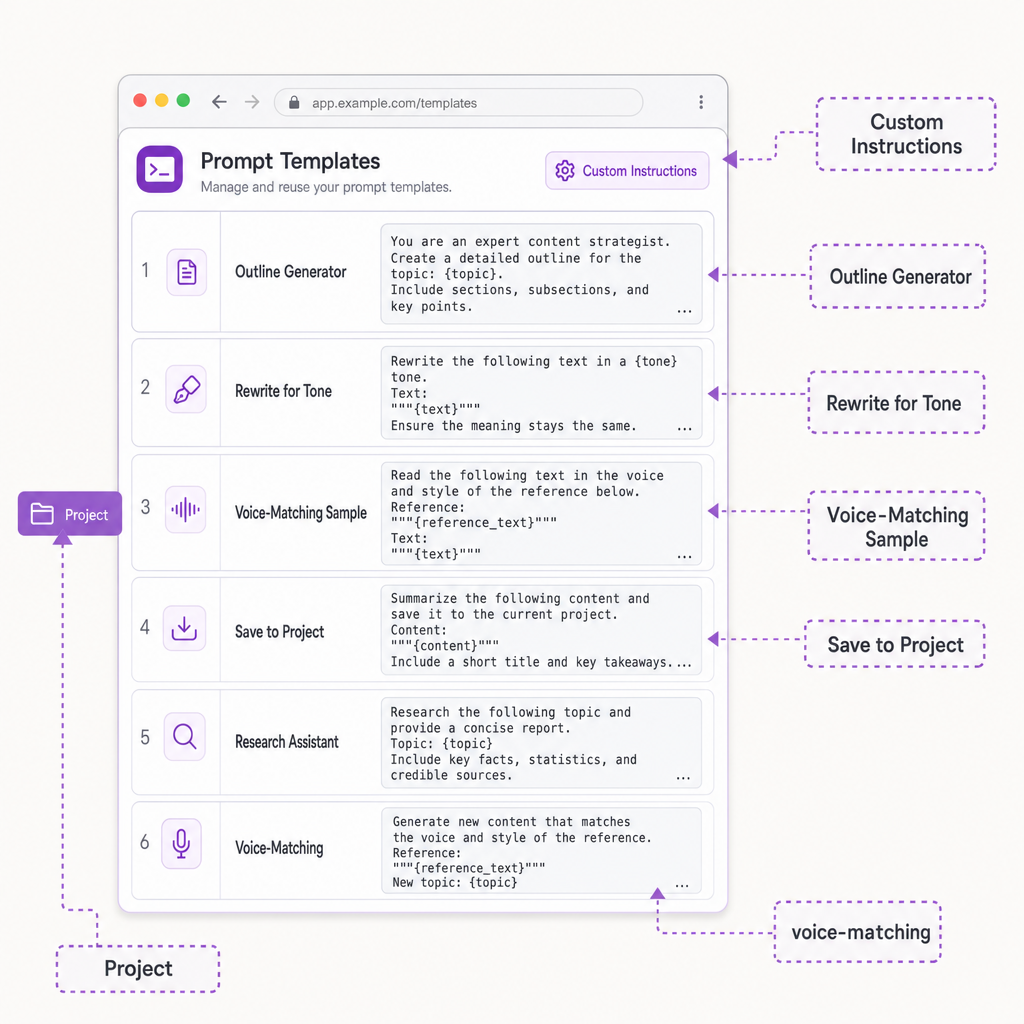
Six copy-paste prompt templates, each pinning role, audience, format, and forbidden moves.
How to Make ChatGPT Sound Like You, Not Like ChatGPT
Default ChatGPT writing reads generic because the model was trained to be helpful and inoffensive. That objective lands on a mid-formality voice with predictable connectives: "moreover," "in essence," "it's important to note." Safe. Smooth. Forgettable.
Why generic output happens
The model averages across millions of writers. Average is the enemy of voice. Without a specific target, you get the statistical center of business English.
The sample-feed method
Open a Project. Paste 3 to 5 samples of your strongest writing from different contexts: a blog post, a client email, a LinkedIn note. Ask GPT-5.5 to extract a style guide covering average sentence length, register, signature phrases, rhetorical moves you lean on, and things you never do. Review it. Edit it. Save it as the Project's instructions. Every chat inside that Project now writes from your house style.
Custom Instructions as a style guard
Use the "what to know about you" field for role and context. Use the "how to respond" field for voice mechanics. Specifics win. "Use contractions, max 18 words per sentence, no em dashes, no 'delve' or 'navigate'" beats "sound conversational" every time.
Keep a banned-words list. Update it quarterly. It's the highest-leverage move you'll make for voice consistency.
One reality check: the model still drifts. A final human pass isn't optional. ChatGPT writes in your voice the way a skilled mimic does, not the way you do.
The Detection and Google Reality Check: What Happens to AI-Assisted Writing
Detector marketing pages are bold. Reality is messier.
What detectors claim
The vendor numbers run hot. GPTZero advertises 99.39% accuracy and a 0% false positive rate on its own 4.1b 2026 benchmark, plus 93.5% recall on humanized text (claiming rivals land under 60%). Originality.ai pitches 99%. Copyleaks claims 99%+ accuracy and a 0.2% false positive rate across 30+ languages. Turnitin says 97% ChatGPT detection at under 1% false positives, now deployed to 2.1M educators across 10,700+ institutions.
How they actually perform
Independent numbers tell a different story. A 2026 Scribbr study put average detector accuracy near 60%, with the best free tool at 68% and the best paid one at 84%. PCWorld clocked GPTZero's real-world accuracy at 62%. University testing on 200+ genuine human submissions flagged 15% as AI. Detectors are confident, not correct. False positives on polished writing and non-native English speakers are well documented. Treating one score as a verdict is a mistake.
Google's stance in 2026
Google doesn't penalize AI-generated content as a category. The March 2026 core update and Google's published guidance prioritize quality and E-E-A-T over production method. What gets penalized is generic, scaled, low-value writing, whether a person or a model produced it. The risk isn't "AI was used." It's "this is shallow and adds nothing new." Real editing, firsthand examples, and original data pull your work out of that bucket.
Ethics, Disclosure, and When AI Assistance Crosses the Line
There's a clean line between AI-assisted and AI-generated writing, and most people who write for a living already know which side they're on.
AI-assisted vs AI-generated
Assisted means GPT-5.5 helped you research, outline, rewrite a clunky paragraph, or pressure-test an argument. You still own every claim. Generated means you prompted, copied, and hit publish. The first is a tool. The second is abdication. Most ethical frameworks (newsroom standards, the AP's 2024 guidance, the Authors Guild's position) accept the first and reject the second.
When to disclose
Google's Search Central guidance says creators should share how content was made when that context matters for trust, especially for heavily automated work. It's rarely required. It often earns goodwill. For opinion writing, personal essays, and first-person reporting, disclose. For technical explainers, reference content, and product copy, the standard is accuracy and accountability, not authorship. Ghostwriting has existed for a century. A model in the loop doesn't suddenly demand a footnote on every B2B blog post.
Where the line moves
Here's the bright line: anything claiming first-hand experience you didn't actually have is fraud. AI tightening your real story into cleaner sentences is editing. AI inventing the story is fabrication. The test isn't "did a machine touch this." It's "are the claims true, and would I defend them under my own name." If yes, you're fine. If no, no amount of humanizing fixes the underlying problem.
ChatGPT vs Claude vs Gemini vs Jasper vs Sudowrite: Which Tool Fits Which Writing Job
Five tools, five jobs. Picking the right one matters more than chasing the "best" one.
Pricing snapshot (April 2026)
ChatGPT Free runs $0 on GPT-5.3 Instant, capped at 10 messages per 5-hour window, with ads in the US free tier since February 9, 2026. Go is $8/mo. Plus is $20/mo and unlocks GPT-5.5, Canvas, Memory, Projects, and limited Deep Research. Pro splits into $100/mo (5x Plus usage, GPT-5.5 Pro) and $200/mo (20x usage, 1M-token context). Business starts at $25/seat/mo annual, 2-seat minimum. Claude Max sits at $100/mo, head-to-head with ChatGPT Pro. Gemini, Jasper, and Sudowrite price by seat or word quota.
Capability snapshot
Claude Sonnet 4.6 and Opus 4.7 hold 200K context standard, 1M on Opus extended. Gemini 3 Pro and 3.1 Pro stretch to 2M tokens in AI Studio. Jasper layers brand-voice training and campaign workflows on top of frontier models. Sudowrite ships character bibles, story beats, and descriptive expansion. QuillBot adds seven rewrite modes. Grammarly handles the editing pass you're probably already running.
The honest pick by job
SEO and blog: ChatGPT Plus.
Long-form analysis: Claude Opus.
Marketing variants inside Google Workspace: Gemini.
Marketing teams with brand governance: Jasper.
Fiction: Sudowrite. ChatGPT reads workshop-flat for most novelists.
Editing layer: Grammarly plus QuillBot, whichever generator you picked.
Which ChatGPT Writing Workflow Fits You: A Decision Framework
Pick your workflow by the job, not the hype.
By writing type
Blog and SEO work: Plus is the sweet spot. Build one Project per content pillar, load a style guide, work in Canvas, then do a human pass that adds first-hand examples and original data. Detection risk stays low when you edit. Google's Helpful Content risk stays low when you add real originality.
Research-heavy writing? Assume detectors are watching. Use ChatGPT for outlining, restating, and stress-testing arguments. Don't ship raw output. Verify every citation by hand.
Fiction: try Plus first, then A/B test Sudowrite for character and worldbuilding. Load a Project with sample chapters so the model has your voice to mimic. Expect heavier editing than nonfiction needs.
Business and marketing copy: Plus is usually enough. One Project per brand, with guidelines plus 5 to 10 past assets loaded in. Gemini 3.1 Pro is worth A/B testing on short-form variants like ad headlines and subject lines.
By risk tolerance
Writing at scale for a team? Business tier ($25/seat annual) gives you shared Projects and training-data exclusion by default. Pro at $200 only earns its keep if you actually need the 1M-token context window or run heavy parallel jobs.
By budget
The Free tier on GPT-5.3 Instant is the most capable free AI writer that's ever shipped. Expect US ads, message caps, and no Deep Research. Go at $8/month is the smallest real step up.
Frequently asked questions
Sources (7)
- 1.OpenAI — Introducing GPT-5.5openai.com
Primary source for GPT-5.5 launch (April 23, 2026), context window (1M in API, 400K in Codex), and API pricing ($5 input, $30 output per 1M tokens).
- 2.OpenAI Developer Docs — GPT-5.5 Modeldevelopers.openai.com
Authoritative source for GPT-5.5 specs: 1,050,000 context window, 128K max output, Dec 1 2025 knowledge cutoff.
- 3.OpenAI — ChatGPT Pricingopenai.com
Official tier pricing for Free, Go, Plus, Pro, Business, Enterprise. Anchor for the pricing block.
- 4.OpenAI Help Center — Projects in ChatGPThelp.openai.com
Official documentation for Projects, Project Memory, and tier availability. Anchors the features section.
- 5.Google Search Central — Guidance on Generative AI Contentdevelopers.google.com
Primary source for Google's official position that AI-assisted content is evaluated on quality, not production method.
- 6.Google Search Central — AI Optimization Guide (updated May 15, 2026)developers.google.com
Confirms that E-E-A-T and helpful-content standards apply equally to AI-assisted content; cites the 'unique point of view' and first-hand experience standards.
- 7.Ethan Mollick — On Writing With AI (Jan 2023)oneusefulthing.org
Canonical primer this article updates. Cite Mollick as the original 'elaborate prompts + chunking + outline-first' framework reference and explicitly note it predates GPT-5.5, Canvas, and Projects.